Edit, query and model DynamoDB
at native speed
Inline edits, PartiQL with autocomplete, and bulk changes with a dry-run so nothing breaks in prod — plus a Single-Table Design studio that maps your access patterns. Native Rust, not Electron.
free for DynamoDB Local · 14-day Pro trial, no card · 30-day money-back
tablyne ❯ connect prod --sso
// 3 accounts · 2 regions · 1 shortcut. credentials stay local.
tablyne ❯ ai "users with no email"
→ PartiQL generated · 8ms · 0 full-scans · 0.5 RCU
- Native, not Electron
- Built in Rust 🦀
- Credentials never leave your machine
- Windows · macOS · Linux
Works with the stack you already use
- AWS SSO
- DynamoDB Local
- LocalStack
- PartiQL
- Apple Silicon
Try it right here — no download
A live, clickable Tablyne running on fictional data. Switch tables, run a real query, browse entities, and design a GSI — all in your browser.
The live, clickable demo runs on desktop — open tablyne.com on your laptop to try it.
What makes it different
The features no one else nails
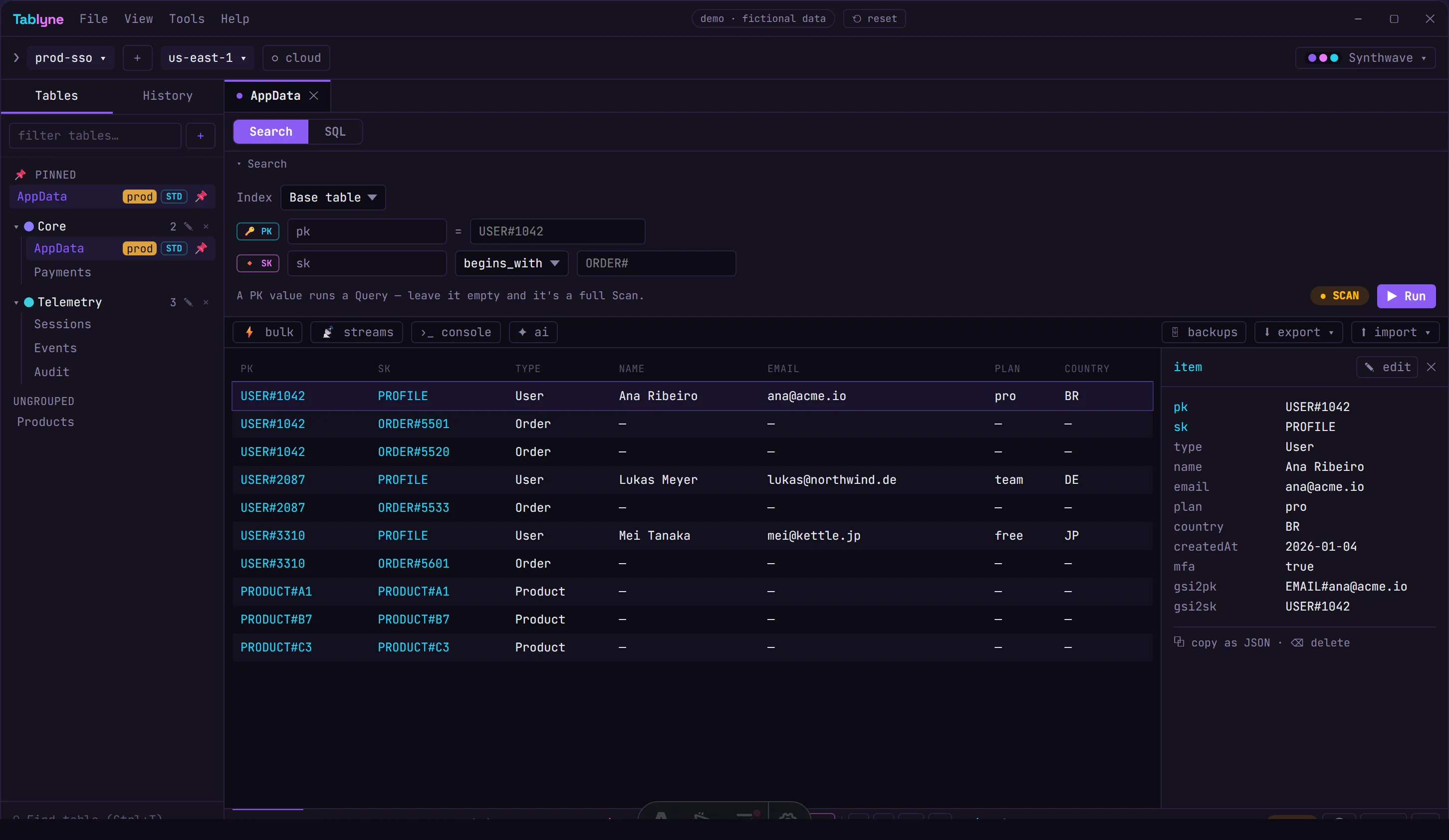
Real screenshots — the actual app, not marketing renders.
Browse & edit
Your whole table, in one fast grid
Query or scan with a builder that shows whether it's a Query or a full Scan before you run it. The selected item docks right beside the grid, so you read and edit without losing your place.
- ✓Query-vs-Scan builder
- ✓Item panel docked beside the grid
- ✓Inline edit · export CSV/JSON/Parquet
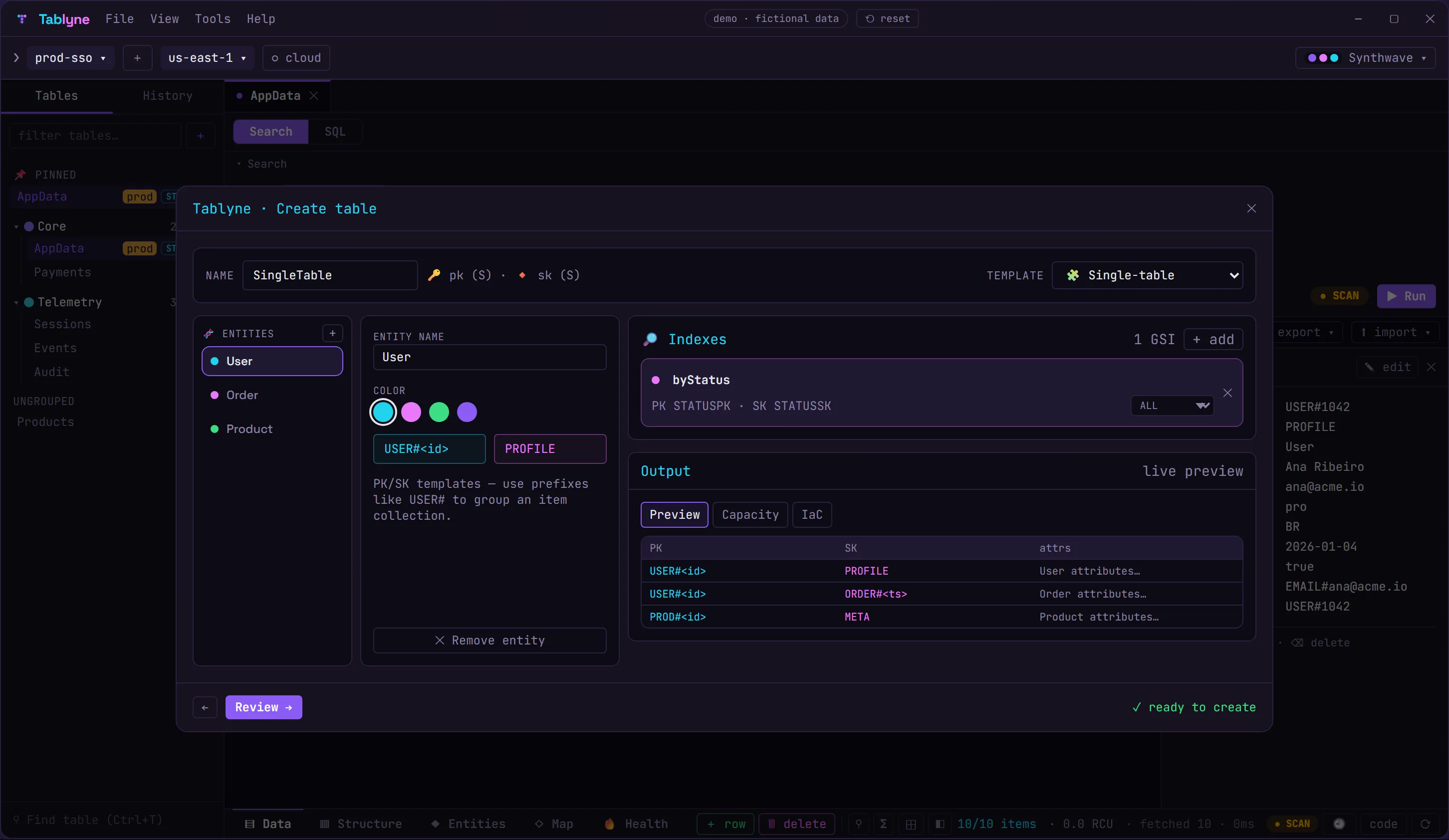
Visual builder
Design a single-table layout from a template
Start from one of eight single-table templates (or blank), shape entities, access patterns and GSIs, and watch a live preview + capacity estimate update as you go. Export the table as CloudFormation or SDK code.
- ✓8 starter templates
- ✓Entities, access patterns & GSIs
- ✓Live preview + IaC export
Single-table design
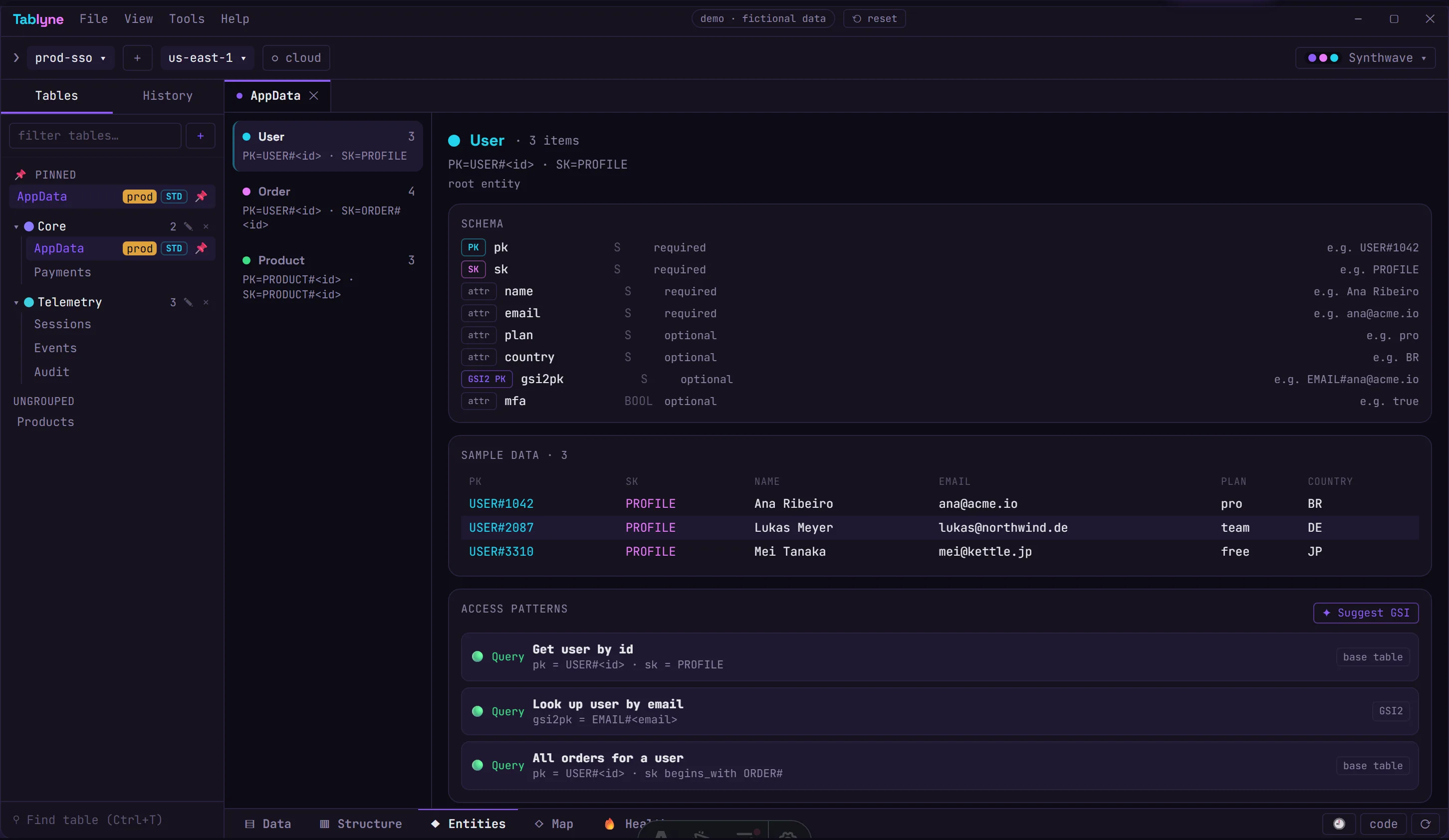
See the model hiding in your table
Point Tablyne at an overloaded table and it reverse-engineers the entities, their keys and relationships from the items you actually store — with schema, sample data and the access patterns each one supports.
- ✓Automatic entity detection
- ✓Schema + access patterns per entity
- ✓GSI suggestions for unsupported reads
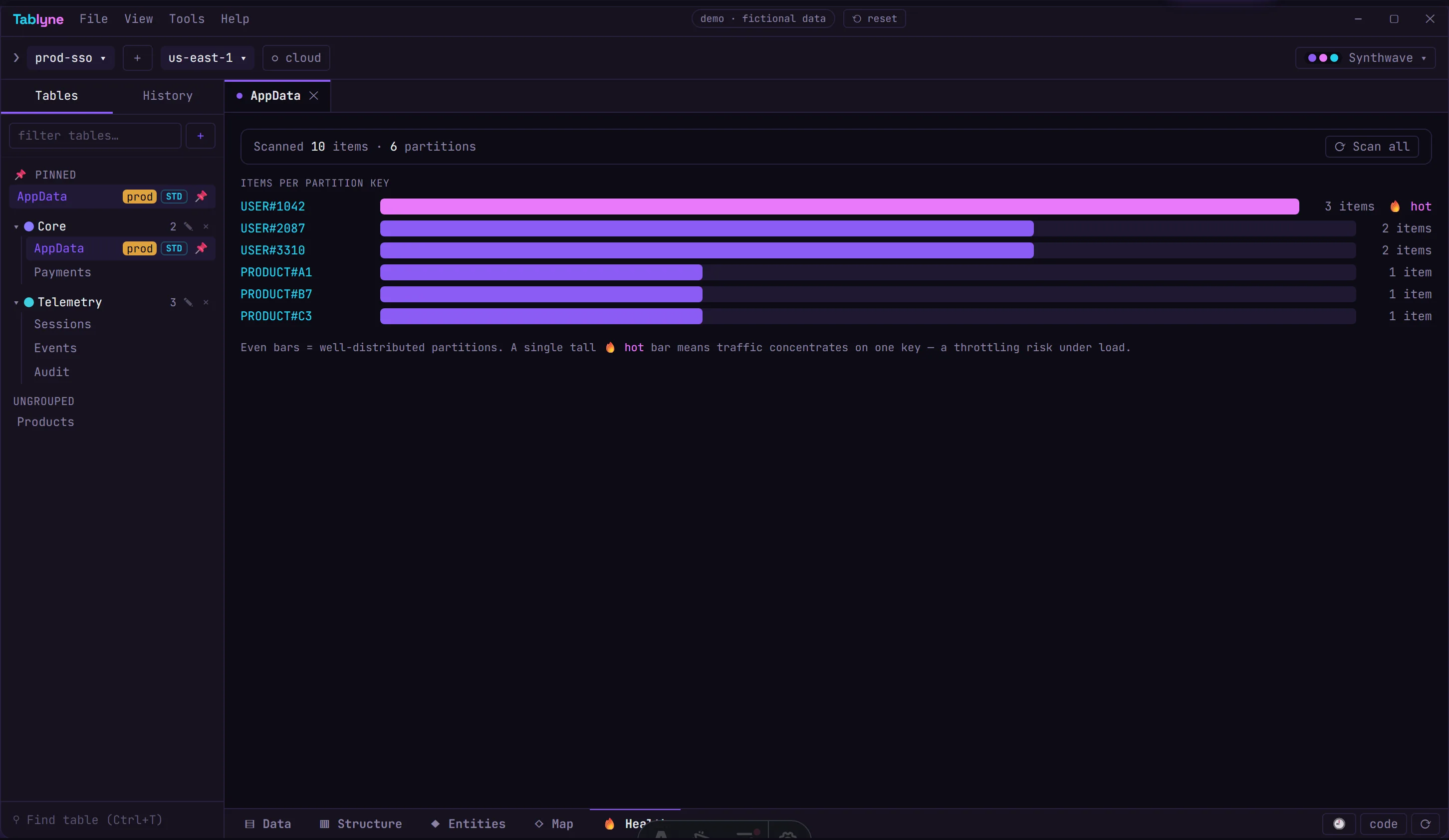
Design linting
Catch hot partitions before they burn you
Tablyne scores your table's design and predicts the classic single-table failure modes — key skew, low cardinality, sequential keys — from your real data. No CloudWatch, no waiting for production to melt.
- ✓Items-per-partition heat map
- ✓Hot-partition detection
- ✓Per-finding guidance
Migrations
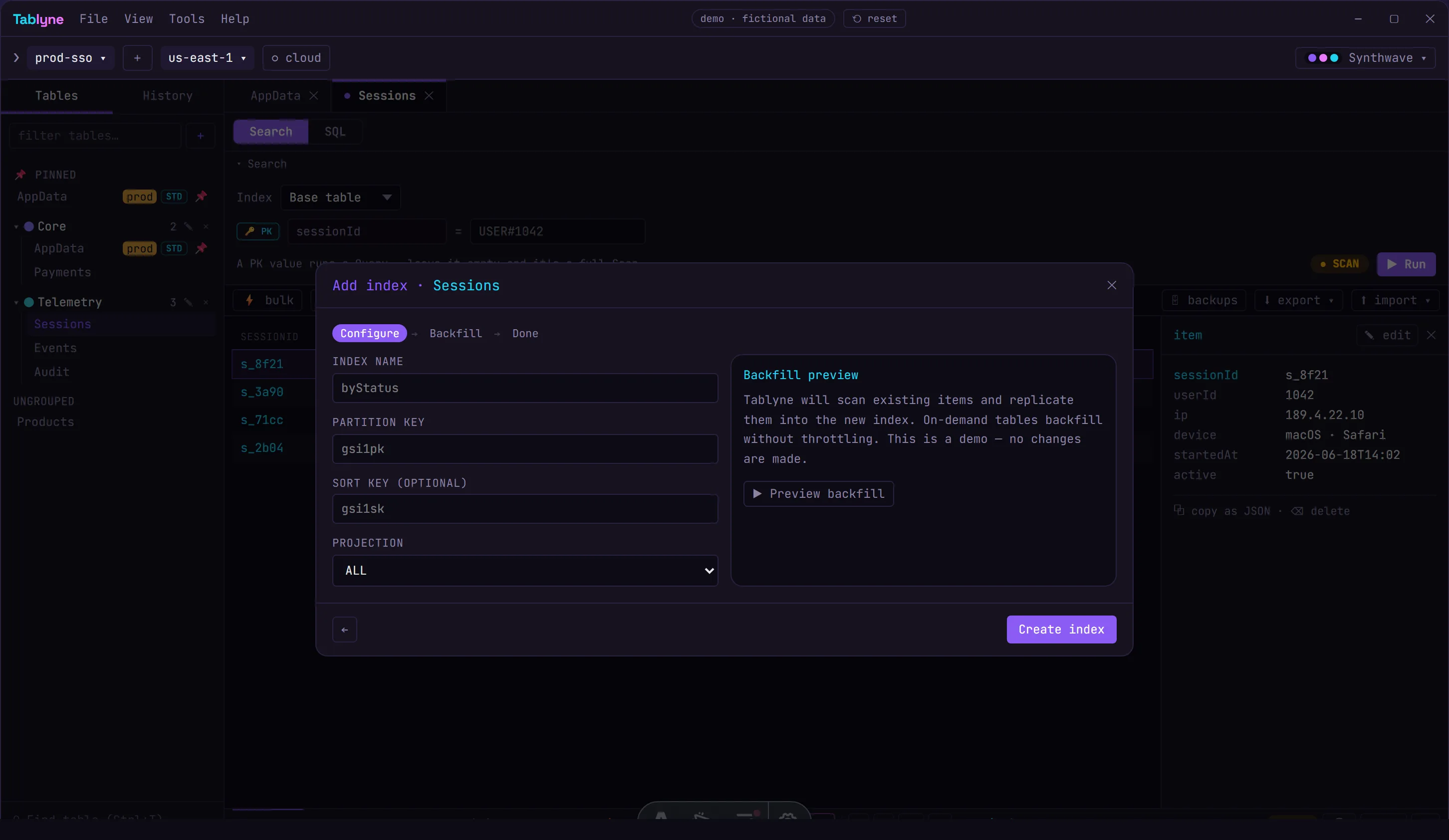
Add a GSI without a migration script
A guided wizard backfills the index onto every item, shows an exact dry-run before any write, creates the index, and lets you roll back in one click. Everyone else just gives you a create form.
- ✓Computed-key backfill + dry-run
- ✓One-click rollback
- ✓Codegen to keep the key fresh
AI → query
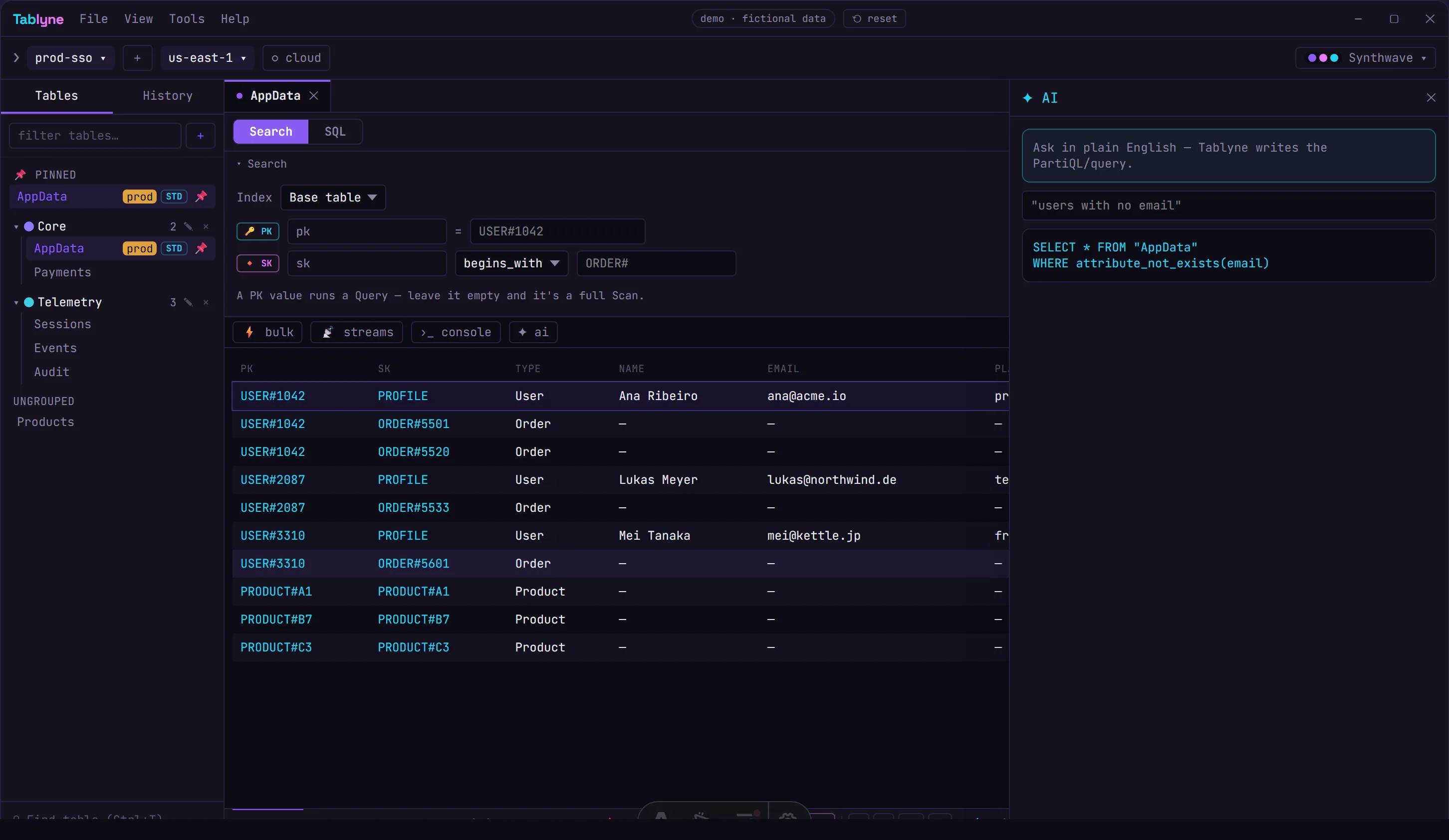
Plain English in, real PartiQL out
Describe what you want and the model writes the query against your actual schema — choosing Query over Scan when it can. Bring your own provider; your keys stay in the OS keychain.
- ✓Schema-aware generation
- ✓Bring-your-own LLM provider
- ✓Runs and shows results inline
Change without fear
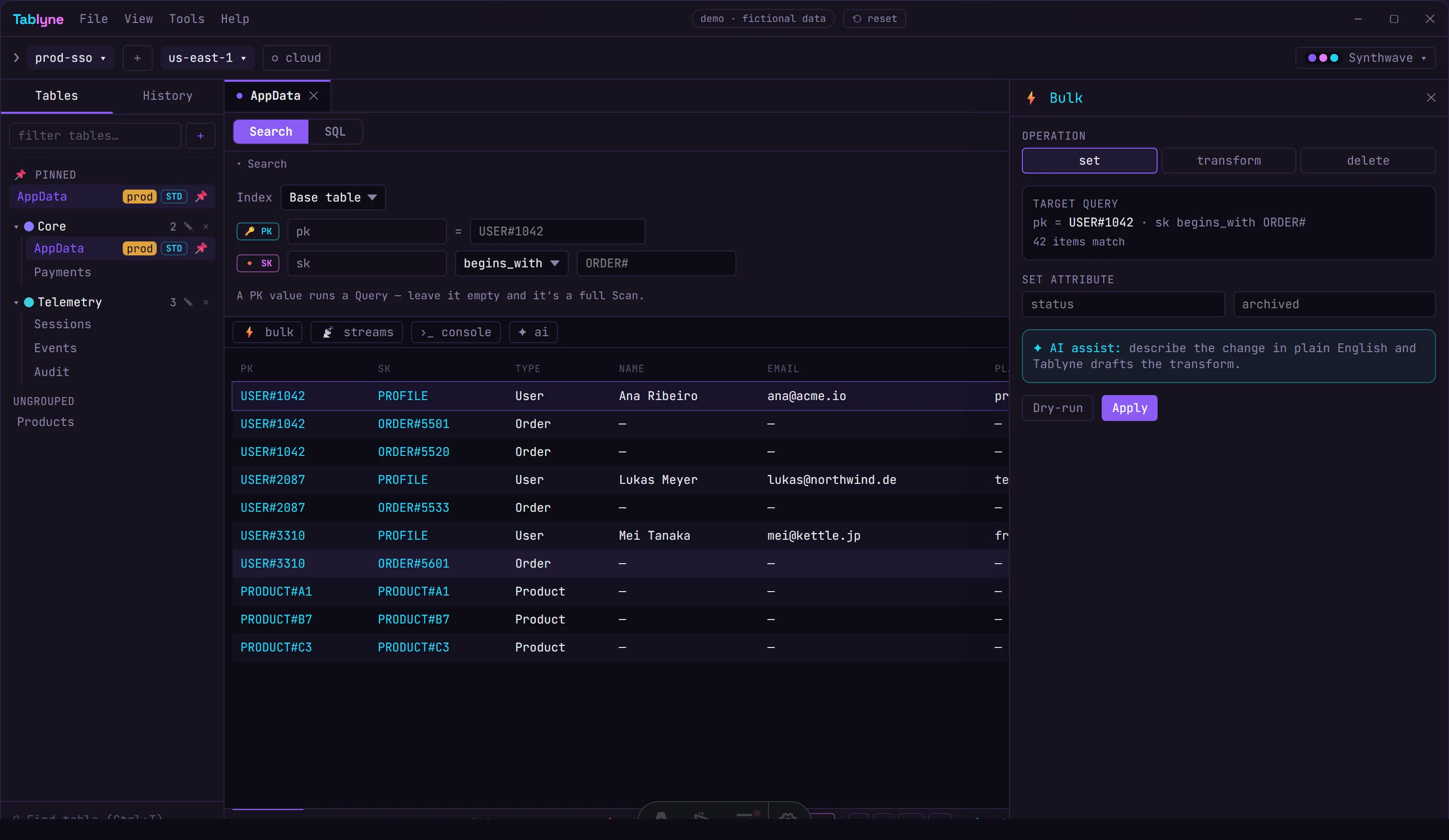
Bulk edits with a real dry-run
Set, transform or delete across a query you can see — with an exact affected count and a true before/after preview before a single write lands. Abortable, and idempotent by design.
- ✓Dry-run + exact count
- ✓Same query builder as the grid
- ✓AI-assisted transforms
Make it yours
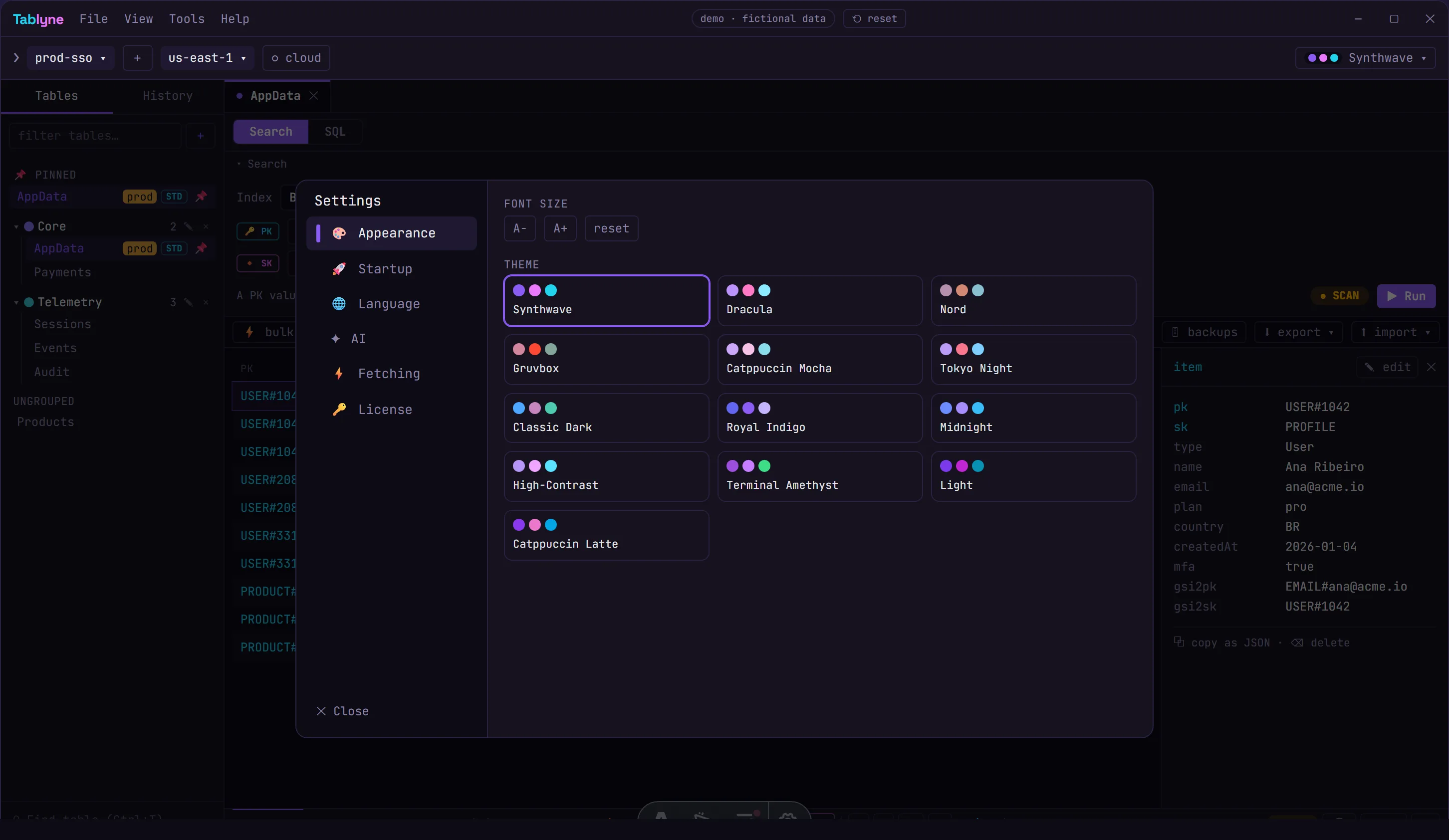
Thirteen built-in themes (and your own)
Dracula, Nord, Gruvbox, Tokyo Night, Synthwave and more — switch the whole app instantly from the color-dot picker, or craft a custom theme. A native desktop app that actually looks the part.
- ✓13 curated themes + custom editor
- ✓Instant, app-wide switching
- ✓Light and dark
Connect
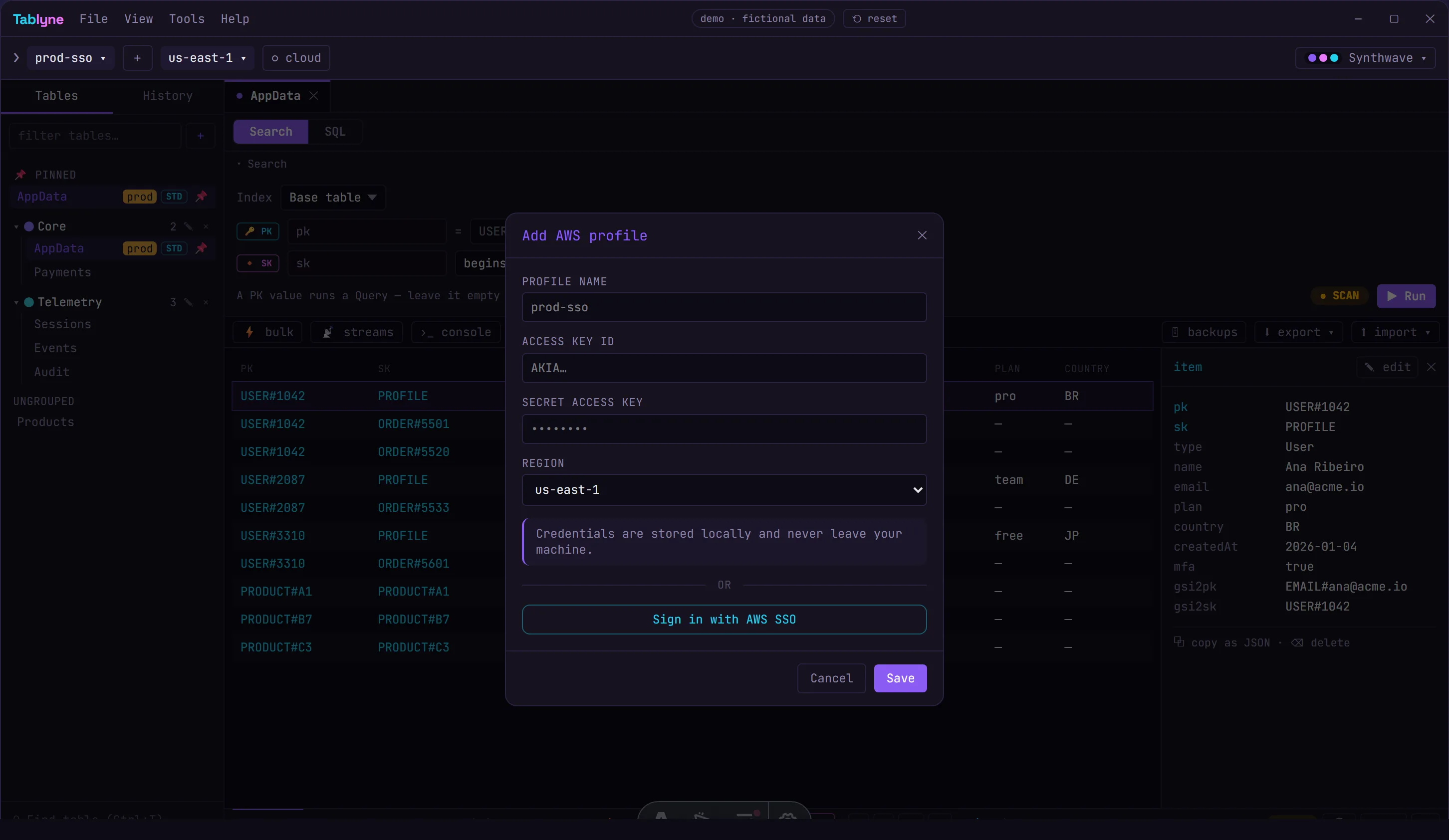
AWS SSO or keys — credentials stay local
Sign in with AWS SSO or add access keys, juggle as many profiles and regions as you need, and point at DynamoDB Local in a click. Credentials live in your OS keychain and never leave your machine.
- ✓AWS SSO sign-in
- ✓Multiple profiles & regions
- ✓Keys never leave your machine
no credit card · 14-day Pro trial · 30-day money-back
The depth a specialist tool gives you
Not a generalist database client with a DynamoDB tab — every feature is built for how DynamoDB actually works.
Every account, region and table at once
Jump between profiles, regions and tables in one workspace. No re-auth, no console tab roulette. Your AWS credentials never leave the machine.
Edit items like a spreadsheet
Click a cell, change it, done. Inline editing over a real canvas grid — even composite PK/SK items stay readable. No JSON gymnastics.
Query IDE that learns your data
PartiQL + native queries with autocomplete trained on your real schema. RCU/WCU and scan count on every run. Zero accidental full-scans.
Terminal / REPL for ad-hoc ops
Find-and-delete in bulk, script one-off migrations, chain operations. The Robo 3T moment DynamoDB never had.
…and a lot more under the hood
The small things a specialist tool gets right — that you only miss when they're gone.
Keyboard-first
Ctrl+K runs everything. Hands stay on the keys, eyes stay on the data.
Tabbed workspace
Open every table in its own tab and multitask like you do in your browser.
Query optimizer
Auto-picks Query over Scan wherever it can. No accidental table-melting full scans.
Works offline
First-class DynamoDB Local & LocalStack. Build on a plane, ship on landing.
Advanced filtering
Filter, sort and slice without hand-writing a FilterExpression.
Code export
Turn any operation into CLI, JS/TS, Python, Go, Java or Rust. Stop hand-writing SDK calls.
Credentials stay local
Your AWS keys and table data never leave your machine — Tablyne talks only to AWS.
Safe truncate
Empty a table without deleting the resource — with a dry-run first.
AWS SSO
Native IAM Identity Center (SSO) sign-in — credentials that refresh instead of expiring mid-session.
Find any table
Type a name and jump to it across every account and region.
Create & manage tables
Spin up tables, configure GSIs and delete resources without the console.
13 themes, instant switching
Dracula, Nord, Gruvbox, Synthwave and more — plus a custom theme editor.
How Tablyne compares
An honest, side-by-side matrix. Most tools won't show you one — we will.
| Feature | Tablyne | Dynobase | Dynomate | NoSQL Workbench | DocKit |
|---|---|---|---|---|---|
| Native (Rust) — not Electron | Yes | No | Yes | No | Yes |
| Multi-account / region / table workspace | Yes | Yes | Yes | Partial | Partial |
| Inline spreadsheet-style editing | Yes | Yes | Partial | No | Partial |
| Bulk ops with dry-run + rollback | Yes | Partial | Partial | No | No |
| Single-Table Design Studio (capacity per entity) | Yes | Partial | No | Partial | No |
| RCU/WCU + scan count per query | Yes | Partial | No | No | No |
| Terminal / REPL | Yes | Yes | Partial | No | No |
| AI — bring your own key (local) | Yes | Partial | No | No | Partial |
| DynamoDB Local / LocalStack | Yes | Yes | Yes | No | Yes |
| Credentials never leave your machine | Yes | Yes | Yes | Yes | Yes |
| Lifetime license option | $99 | $199 | No | free | free |
| Free tier (local-only) | Yes | No | Yes | Yes | Yes |
| Free trial length | 14 days | 7 days | 14 days | free | free |
| Devices per seat | 4 | 3 | — | ∞ | ∞ |
| 30-day money-back | Yes | No | Yes | free | free |
✓ full · ~ partial · — none. Compiled 2026 from vendors' own sites; corrections welcome.
No fake testimonials. We're in public beta — judge it yourself.
Get the beta when it opens — plus a launch-day discount:
Simple pricing. Own it for $99.
Half the price of Dynobase's $199 lifetime. Free forever for local development.
How it works: a seat = one person. Each seat runs on up to 4 devices — every plan, deactivate old ones anytime. Team is billed per seat; add or remove seats whenever your team changes.
Free — Local
For DynamoDB Local & LocalStack
- ✓Mac, Windows & Linux
- ✓DynamoDB Local & LocalStack only
- ✓Core features
- ✓No account needed
Pro
For the working DynamoDB dev
- ✓Mac, Windows & Linux
- ✓All features
- ✓All future updates
- ✓PartiQL queries
- ✓Email support
Lifetime
Pay once. ≈ 20 months of Pro, then yours forever.
vs $199 at Dynobase
- ✓Mac, Windows & Linux
- ✓All features
- ✓All future updates
- ✓PartiQL queries
- ✓Email support
Team
For teams shipping on DynamoDB — from 2 seats
$14/mo for 2 seats
Billed per seat · minimum 2 · add or remove anytime.
- ✓Mac, Windows & Linux
- ✓All features
- ✓All future updates
- ✓PartiQL queries
- ✓Email support
- ✓14-day trial — no credit card
- ✓Up to 4 devices per seat
- ✓30-day money-back
- ✓Windows · macOS · Linux
Prices in USD. VAT/GST is handled automatically at checkout — you pay in your local currency.
Download Tablyne
Free for DynamoDB Local. 14-day trial for everything else. No credit card.
v1.0.114-day trial, no credit card
Frequently asked questions
How does Tablyne connect to DynamoDB? +
Tablyne uses your local AWS profiles and SSO. Credentials are read on your machine and never sent to our servers or any third party. The data layer runs in native Rust, so even large scans stay fast.
Is there a free version? +
Yes. The Free — Local tier works forever against DynamoDB Local and LocalStack at no cost, no credit card. Pro adds connections to your real AWS accounts with a 14-day free trial.
Lifetime vs subscription — what's the difference? +
Lifetime is a one-time $99 purchase (one seat, up to 4 devices) that includes all future updates and works forever. Pro is a subscription ($7/mo or $59/yr) for those who prefer to pay as they go. Both unlock the same features.
Which platforms are supported? +
Windows, macOS (Intel and Apple Silicon) and Linux. Tablyne is a small native app built with Tauri and Rust — not Electron.
Does Tablyne work with DynamoDB Local and LocalStack? +
Yes, fully — and it's free for local-only use. Point Tablyne at your local endpoint and work offline.
Can I get a refund? +
Yes. Every paid plan includes a 30-day money-back guarantee. If Tablyne isn't for you, email us within 30 days for a full refund.
What's a seat, and how many devices can I use? +
A seat is one person. Every paid plan — Pro, Lifetime and Team — activates on up to 4 of your own devices per seat. Deactivate old devices anytime. Team is billed per seat (one per teammate); add or remove seats whenever your team changes.
Support that actually replies
Built by developers, for developers. No ticket black holes.